
Credits
How credits work, typical task costs, and tips for managing usage
Deliverables AI uses a credit system to track AI usage. Credits meter the AI compute a task actually uses — there are no fixed per-action prices. A task's cost scales with how much research, generation, and revision it involves, and everything a task does (reading your sources, web research, generating slides or documents, revising) draws from the same credit balance.
Typical task costs
These ranges are measured from real production tasks, end to end — including source processing and revision rounds:
| Task | Typical credits |
|---|---|
| Quick question or lookup | under 25 |
| Research answer or analysis | 40–200 |
| Written report or memo | 200–700 |
| Short deck or teaser (up to ~15 slides) | 300–1,500 |
| Long-form deck or CIM (25–50 slides) | 2,500–6,000 |
| Financial model | 500–2,500 |
Long-form decks average roughly 50–125 credits per slide. Shorter decks cost more per slide because the research and setup a deck needs doesn't shrink with slide count — which is why we quote costs per task rather than per slide.
What drives cost?
- Model choice — Faster models use fewer credits; the most capable models use more
- Scope and depth — A deck that synthesizes many sources, or research that fans out across the web, uses more compute than a quick lookup
- Deck length — More slides means more generation and review compute
- Revision rounds — Each revision turn bills the compute it uses; targeted edits cost far less than full regeneration
- Image generation — AI-generated images add to the cost; slides using stock images or no images cost less
View your balance
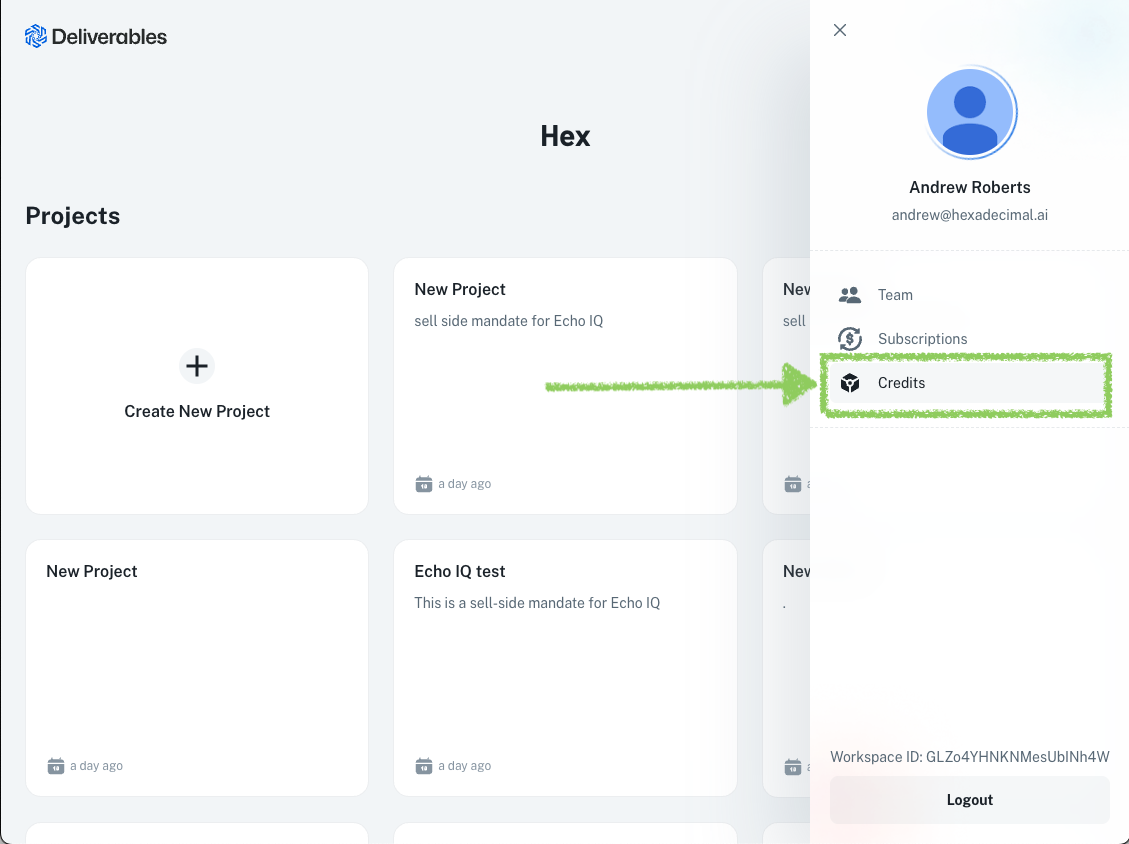
- Select your profile icon in the upper right
- Select Credits
You'll see:
- Remaining credits for the current billing period
- Usage chart showing credit consumption over time
- Usage log with details of each task
Understand the usage log
The usage log shows:
- Date and time of each task
- Credits consumed
- Project and deliverable associated
Credit reset
Included plan credits reset at the beginning of each billing cycle and don't roll over to the next month. Purchased top-off credits do roll over.
Track team usage
If you're on a team plan, you can see usage across all team members. This helps with:
- Understanding total consumption
- Planning credit allocation
- Identifying heavy usage periods
Usage log for governance and compliance
The usage log doubles as a lightweight audit trail. For teams with internal compliance requirements — common in PE, investment banking, and advisory — the log provides a clear record of:
- What was generated — Which deliverables were created, when, and for which project
- Who generated it — Team member attribution on team plans
- What it cost — Credit consumption per task, useful for internal cost allocation across deals or clients
This transparency is useful for firms that need to demonstrate oversight of AI-assisted work product, track usage against internal policies, or allocate platform costs across engagement codes.
Run low on credits?
If you're running low:
- Buy top-off credits ($0.01/credit when you buy ahead, or $0.02/credit with auto-reload) from Settings → Billing (top-off credits roll over)
- Upgrade to a higher tier for more included monthly credits at a better effective rate
- Contact us about Enterprise pricing for high-volume needs
Scope the task, not the tool: a focused prompt with the right sources attached gets to a finished deliverable in fewer revision rounds — and fewer rounds is the biggest credit saver.