
Create documents
Specialized agents that create written documents like memos, reports, and analyses
Document agents create written deliverables (.docx) from your sources: investment memos, research reports, strategic analyses, and more.
While Presentation Maker is designed for slide decks, document agents are optimized for longer-form written content that requires depth and detail.
Document output is functional analytical prose — well-structured text with headers, bullet points, and tables, but not a designed document with styled layouts. Think of it as the content a senior analyst would write, not a formatted brochure. If you need a visually designed deliverable, use Presentation Maker to generate a PowerPoint instead.
How document agents work
- Add sources to your project
- Select Select agent and choose a document agent
- Describe what you need in the prompt — or select a starter prompt (see below)
- The agent analyzes your sources and generates a professional document
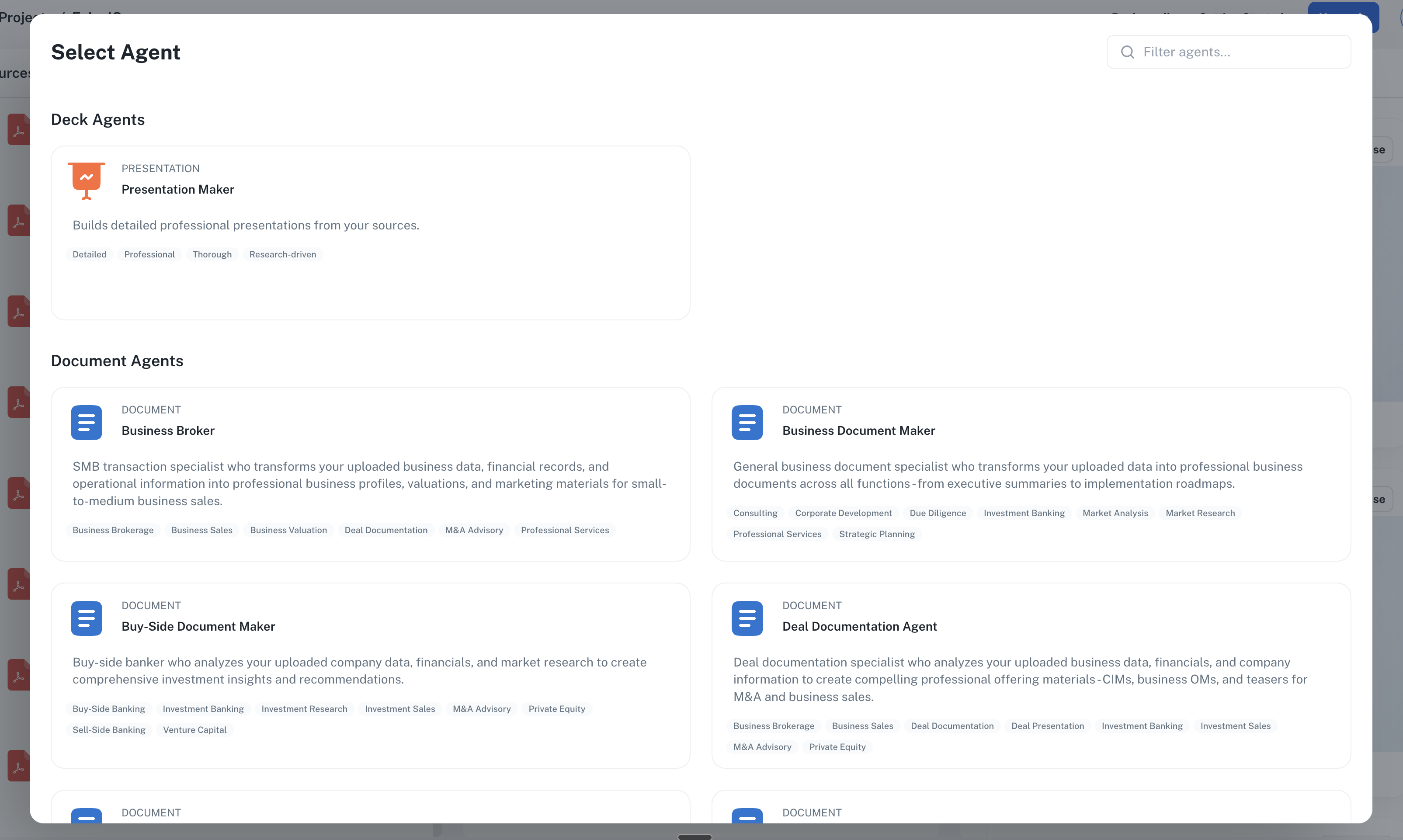
Use the search box in the top right of the dialog to quickly find agents by name or specialty.
Starter prompts
Every document agent comes with a set of built-in starter prompts — pre-written instructions for the most common tasks that agent handles. They appear as clickable cards below the prompt field.
How to use them:
- Select a document agent
- Scroll below the prompt field to see the starter prompts for that agent
- Click any card to load the prompt into the text field
- Edit the prompt to fit your specific situation
- Generate as normal
Examples from the Deal Documentation Agent:
- "Build executive summary and highlights"
- "Create valuation methodology overview"
- "Generate confidential information memorandum"
- "Produce financial performance summary"
Starter prompts are a good starting point when you're not sure how to phrase a request, or when you want to see what the agent is designed to produce. You can always edit the loaded prompt before generating.
Starter prompts on built-in agents are fixed. If you create a custom agent, you can add, edit, and reorder your own starter prompts to build a library of prompts tailored to your workflow.
Available document agents
Document agents are organized by specialty:
Investment & Finance
- Deal Documentation Agent - CIMs, offering memorandums, teasers, management presentations
- Investment Analyst - Deal screening, investment memos, due diligence reports
- Financial Analysis Expert - Financial summaries, valuation analyses, projections
Strategy & Operations
- Strategic Consultant - SWOT analyses, strategic plans, framework applications
- Market Intelligence Expert - Market research, competitive landscapes, customer analyses
- Implementation Expert - Roadmaps, stakeholder plans, decision frameworks
Specialized Domains
- HR Professional - Employee handbooks, interview guides, policy documentation
- Marketing Strategist - Content strategies, brand positioning, campaign plans
- Real Estate Analyst - Property analyses, market reports, offering memorandums
- Risk & Compliance Expert - Risk registers, compliance assessments, decision matrices
- Business Broker - Business profiles, valuations, marketing materials
Browse the full skills library to explore all available skills and their capabilities.
Document agents vs. Presentation Maker
| Use Presentation Maker for... | Use a Document Agent for... |
|---|---|
| CIMs, management presentations | Written CIM narratives, investment memos |
| Slide decks (.pptx) | Written documents (.docx) |
| Visual presentations | Detailed analysis and prose |
| Board decks, pitch decks | Due diligence reports, research |
Converting documents to presentations
Document agents produce text-based output (.docx), not slides. If you need a presentation based on your document analysis, use this two-step workflow:
Workflow: Document analysis → Presentation
- Generate your document — Use a document agent (e.g., Investment Analyst) to create a deal screening memo or analysis
- Download the document — Save the generated Microsoft Word (.docx) or PDF file
- Create a new project — Or use your existing project
- Upload the document as a source — Add your generated memo alongside any other source materials
- Generate a presentation — Use Presentation Maker to create a deck based on your analysis
Create a 10-slide buy-side pitch deck for our investment committee based on the deal screening memo in my sources. Focus on the investment thesis, key risks, and valuation analysis.
Why this works well
- Research once, present twice — The document agent does deep analysis; the presentation agent turns it into visuals
- Consistent narrative — Your deck reflects the conclusions from your written analysis
- Flexible output — Use the document for internal review, the deck for committee presentations
This workflow is particularly useful for buy-side teams who need both a detailed investment memo for documentation and a polished presentation for investment committee meetings.
Customizing agents
Need consistent output across your team? Custom agents let you:
- Standardize structure — Same sections and slide count every time
- Enforce brand guidelines — Voice, tone, and formatting rules
- Share best practices — Instructions that work for any team member
Custom agents work with both Presentation Maker and document agents. Start from any existing agent and customize it for your workflow.
Need a specialized agent?
If you need an agent type that doesn't exist yet, request a custom template. Our team can create specialized agents tailored to your workflow.